
Millions of US students do not know their grade until the semester is already over. They guess, use spreadsheets, or wait for their professor to post a final average. All three options waste time and create unnecessary stress. This free grade calculator gives you a clear answer in seconds. Enter your scores and weights to calculate your percentage, overall letter grade, and GPA instantly. No math skills or sign-up required.
Grade Calculator | Weighted, Percentage & Points | Instant Results
Calculate your overall grade, letter grade, and GPA instantly.
Enter each assignment’s grade. Assignment name is optional.
Calculate Grade
This page covers the full US grading scale, including letter grades, GPA values, and percentage ranges. Real examples make it easy to understand simple averages, weighted courses, and points-based grading. You will also learn how to find the score you need on your final exam, avoid common mistakes that lead to wrong results, and follow practical tips to protect your grade all semester.
How to Use This Grade Calculator
Follow these five steps to calculate your grade on grades-calculator.us:
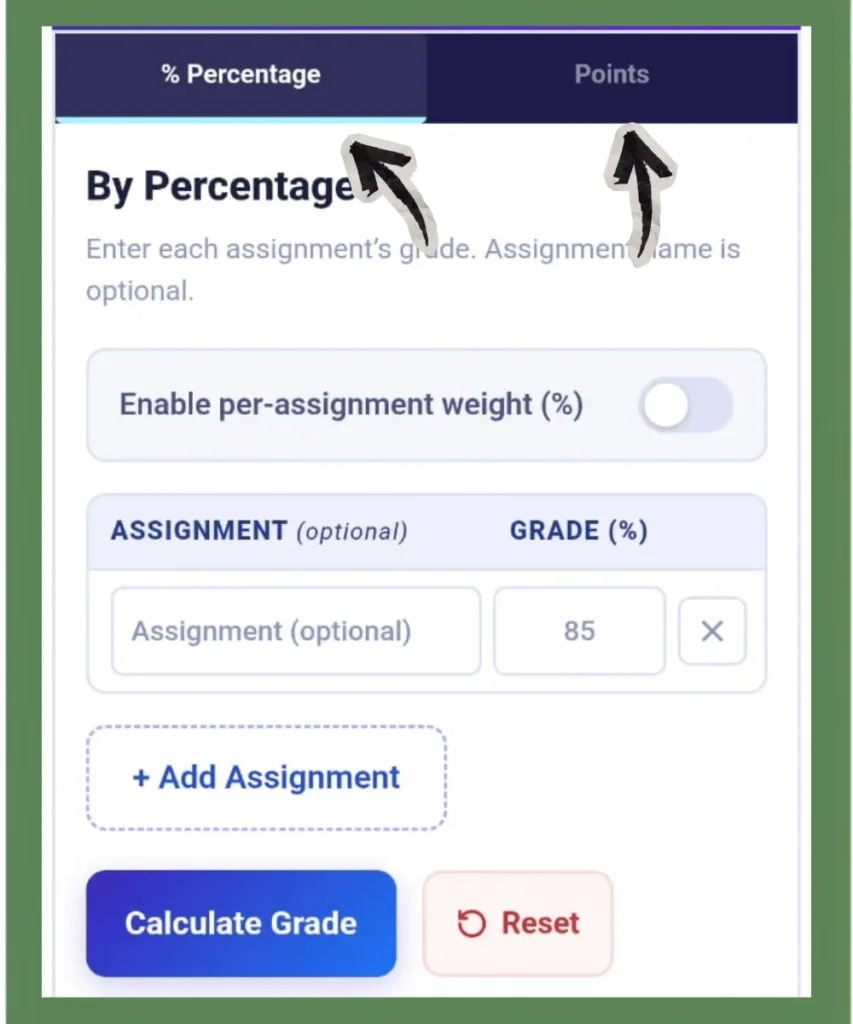
Step 1 (Pick Your Mode)
- Choose "Percentage" if your professor gives grades to assignments as percentages (like 80% or 76%).
- Choose "Points" if your scores are raw numbers, such as 45/50 or 120/150. In this mode, enter your earned points and total possible points (optional). The calculator converts them to a percentage and a letter grade.
Since both modes calculate results, choose the one that matches your grading system.
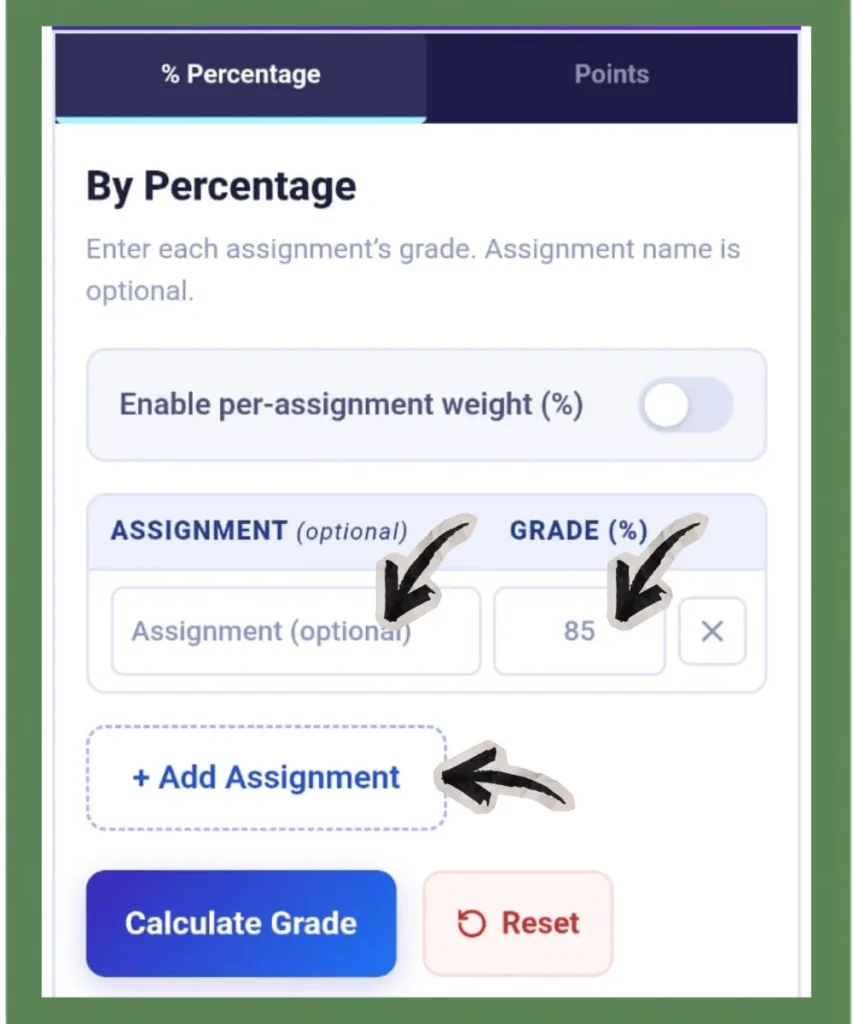
Step 2 (Enter Your Scores)
Type each assignment score into its own row. The assignment name field is optional, so you can label rows as Midterm, Quiz 2, Final Project, etc., or leave them blank. You can add unlimited rows as needed.
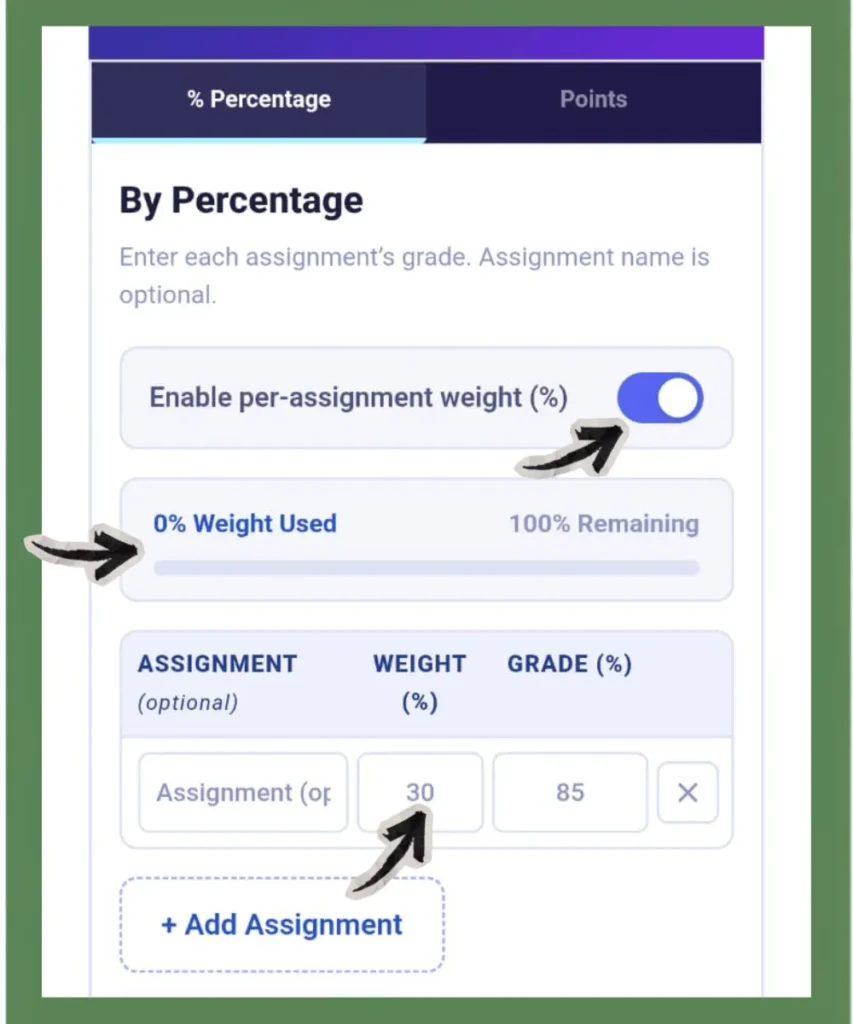
Step 3 (Add Weights if Your Class Uses Them)
Enable the per-assignment weight option if your syllabus assigns different percentages to different assignments. Enter the weight for each row. The calculator shows you how much weight you have used and how much remains. Make sure all weights add up to 100% to get instant results.
Not sure about weights? Check your course syllabus or ask your professor. Weights are usually listed in a table on the first or second page.
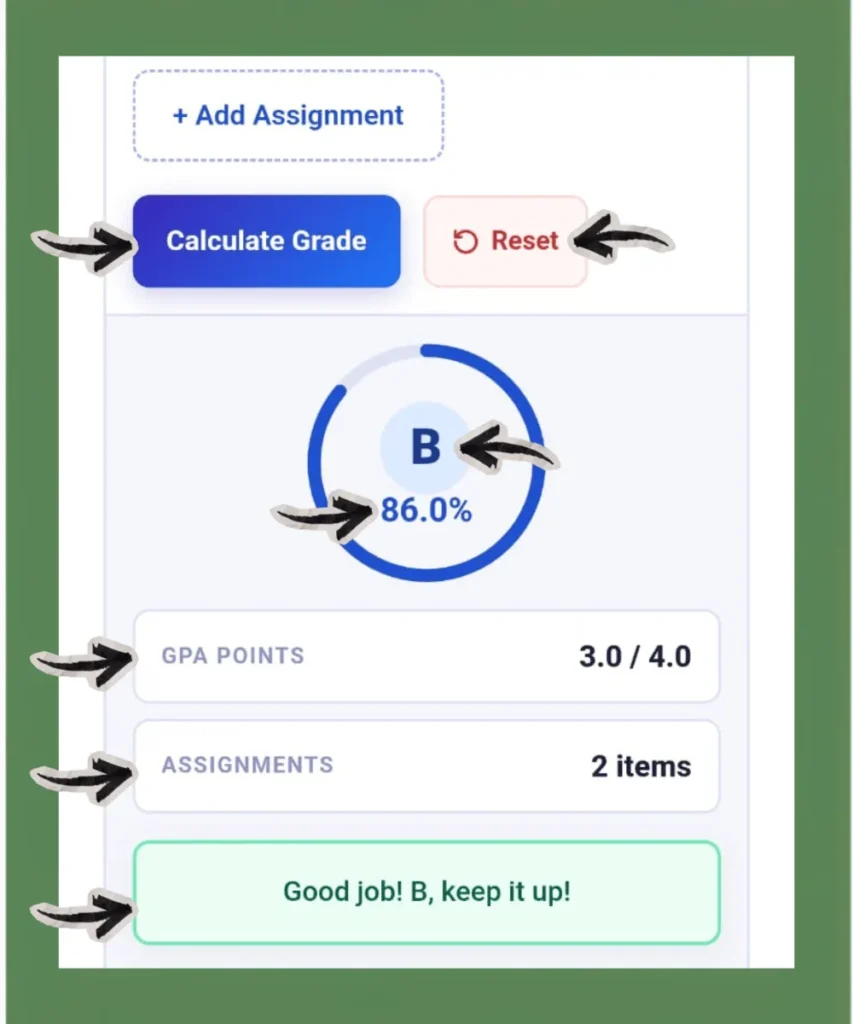
Step 4 (Calculate and Read Your Result)
Press the “Calculate Grade” button. Your result shows four things: your overall percentage, your letter grade, your GPA point value, and the number of assignments counted. There is also a "Reset" button.
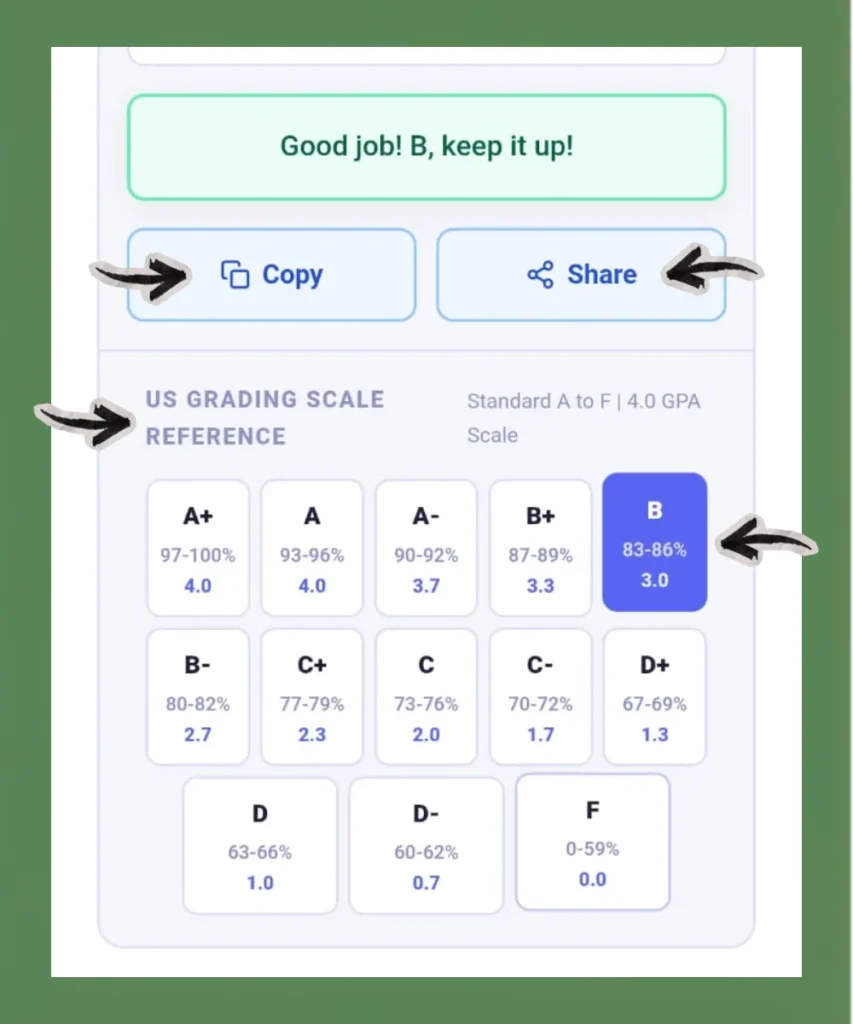
Step 5 (Use Copy or Share)
Use the Copy or Share button to save your result or send it to your teacher or parents.
Grade Calculation Examples
Real examples make the math easier to follow. Here are five common scenarios that cover most grading situations that students face.
Example 1: Simple Percentage (High School Quiz Grades)
A 10th-class student with four quiz scores and no weights.
| Assignment (optional) | Grade (%) |
|---|---|
| Quiz 1 | 78 |
| Quiz 2 | 85 |
| Quiz 3 | 90 |
(78 + 85 + 90) ÷ 3 = 84%, B, GPA 3.0
Example 2: Weights Given in Percentage
| Assignment (optional) | Weight (%) | Grade (%) |
|---|---|---|
| Homework | 20 | 90 |
| Midterm exam | 30 | 84 |
| Final exam | 50 | 79 |
Weighted Grade = (0.20×90)+(0.30×84)+(0.50×79) = 18+25.2+39.5 = 82.7
Hence, the result is 82.7%, B-, GPA 2.7.
Since, Weighted Grade=(w1×g1)+(w2×g2)+(w3×g3)+⋯+(wn×gn); where, w1,w2,w3,…,wn are the weights and g1,g2,g3,…,gn are the corresponding grades.
A college freshman has a syllabus that weights homework at 30%, the midterm at 30%, and the final exam at 40%.
Example 3: Weights Given in Points or Credit Hours
Sometimes, weights are not given as percentages. Instead, they are given as credit hours, points, or units. For example, a student has three courses:
| Course | Grade (%) | Credit Hours |
|---|---|---|
| Math | 92 | 3 |
| Physics | 87 | 4 |
| English | 74 | 2 |
Step 1: Multiply Each Grade by Its Weight
92×3 = 276, 87×4 = 348, 74×2 = 148
Step 2: Add All Weighted Scores
276+348+148 = 772
Step 3: Add All Weights
3+4+2 = 9
Step 4: Divide
772÷9 = 85.78%
After calculating your weighted percentage using the above steps, enter that final percentage into the calculator above to get your letter grades and GPA.
Example 4: Points-Based STEM Course
A college student gets points for each lab assignment. At the end of the course, the teacher adds all the points to find the final grade.
| Assignment (optional) | Earned Points | Total Points |
|---|---|---|
| Lab Report 1 | 40 | 50 |
| Lab Report 2 | 47 | 50 |
| Midterm Lab | 87 | 100 |
| Final Lab Exam | 175 | 200 |
349 ÷ 400 =87.25%, B, GPA 3.3
Example 5: What Score Do I Need on My Final?
If you currently have 79% before the final exam, and the final exam is worth 30% of your total grade. Then you need an overall grade of 83% to finish the semester with a B.
Current grade = 79% | Final exam weight = 30% | Target grade = 83%
Step 1: Points you already have
79 × 0.70 = 55.3 pts
Step 2: Points still needed
83 − 55.3 = 27.7 pts
Step 3: Required final exam score
27.7 ÷ 0.30 = 92.3%
Hence, you need at least a 93% on the final to finish with a B.
In the calculator, enter your current grades and try different final exam scores until you reach your target. To instantly calculate the exact score you need on your final, head over to our Final Grade Calculator.
Features of This Grade Calculator
This online calculator covers almost every grading situation that U.S. students face. It is very simple and easy to use. No extra tools needed, no sign-up, and no setup. Here is what it does:
Percentage-Based Grade Calculator
Select Percentage mode and enter each assignment score as a percentage. This works for any course where your professor posts grades like 88% or 76%. The calculator takes all your scores, applies any weights you set, and shows your final grade instantly.
Weighted Grade Calculator
Enable per-assignment weight to set a different percentage for each assignment. This calculator with weights tracks how much of the 100% you have used and how much remains as you fill in each row. This prevents the most common calculation error of weights not adding up to 100%.
Points-Based Grade Calculator
Select Points mode and enter your earned points for each assignment. The total possible points field is optional, so leave it blank if you do not know it yet. With this system, the calculator divides your earned points by the total possible points and automatically converts the result into a percentage, letter grade, and GPA.
Letter Grade and GPA Output
Every result shows three things at once: your overall percentage, your letter grade on the standard A to F scale, and your GPA point value on the 4.0 scale. You do not need to look up a separate grading scale; the result gives you everything together.
Built-In US Grading Scale Reference
The calculator includes a built-in US grading scale reference right below your result. It covers the standard A to F letter grades with percentage ranges and GPA values on the 4.0 scale. No need to open a separate tab or search for a grading scale; everything you need is already on the same page.
Unlimited Assignment Rows
Add as many assignment rows as your course requires. There is no cap. Whether your syllabus has five assignments or fifty, the calculator handles all of them in one place.
Copy or Share Result
After you calculate your grade, use the Copy or Share button to save your result or send it to your teacher or parents.
Free and No Sign-Up
Open the page and start calculating. No account, no email, no subscription. The calculator is fully free with no restrictions.
Mobile-Friendly
This calculator works on any device. Open it on your phone, tablet, or desktop, and it loads the same way every time. Enter your scores, set your weights, and get your result without any layout issues or extra steps.
Is This Grade Calculator Accurate?
Yes, but always ask your professors to confirm the exact grading rules for your program or department.
The calculator uses the same weighted average formula your professor uses. It does not estimate or approximate. It multiplies each score by its exact weight, adds the results, and returns your grades. Three things make the result trustworthy:
- You can control the inputs: The calculator only uses the numbers you enter. No assumptions, no hidden adjustments.
- Weight validation: If the total weight is less than or greater than 100%, the tool will show an error message. This prevents the most common calculation error students make.
- Transparent formula: The math behind every result matches the standard US grading formula used by high schools and universities nationwide.
The only way a result can be wrong is if the inputs are wrong. Always double-check your weights against your syllabus before calculating.
Who Can Use This Grade Calculator?
This calculator is free for any student in the USA grading system, including high school, college, and graduate level. Think of it as a free grade checker. Open it after every graded assignment, and you always know where you stand.
- High school students can use it to track quiz and test scores.
- College students often use it during midterms and finals to see where they stand before the final exam.
- Graduate students can use it for any course based on percentages or letter grades.
- It is also beneficial for students on scholarships who need to maintain a certain grade.
The calculator supports both weighted percentage and points-based grading, which are the most common systems in US schools. It uses the standard A to F scale with plus and minus grades, and the 4.0 GPA system. No setup is needed. Just open the page, enter your scores, and get your result.
Why Use a Grade Calculator?
A grade calculator is a tool that computes your course grade from your scores. It handles the math automatically.
Most US courses don’t have the same values. A small homework counts less than a big final exam. A grade calculator understands these differences and gives a real picture of where you stand. Generally, there are three situations where students use it:
- Mid-semester check-in: See where you stand before the final.
- Final grade planning: Figure out what score you need on an upcoming exam to hit your target grade.
- After grades post: Verify the calculation and make sure your result actually makes sense.
This calculator handles all three situations. Whether you need a grader for school assignments or a weighted average calculator for college courses, this tool handles both. You can use it at any point/time during the semester.
The US Grading Scale - Letter Grades, Percentages, and GPA
In the United States, grades are shown as letters from A+ to F. Each letter represents a range of percentage scores and maps to a GPA value on the 4.0 scale. This system applies across nearly all public high schools, community colleges, and universities in the country.
1. Main Scale
| Letter Grade | Percentage | GPA |
|---|---|---|
| A+ | 97–100% | 4.0 (4.3 at some schools) |
| A | 93–96% | 4.0 |
| A- | 90–92% | 3.7 |
| B+ | 87–89% | 3.3 |
| B | 83–86% | 3.0 |
| B- | 80–82% | 2.7 |
| C+ | 77–79% | 2.3 |
| C | 73–76% | 2.0 |
| C- | 70–72% | 1.7 |
| D+ | 67–69% | 1.3 |
| D | 63–66% | 1.0 |
| D- | 60–62% | 0.7 |
| F | 0–59% | 0.0 |
Use the grade conversion table above to find your letter grade and GPA value based on your percentage score. This grade chart for school covers the standard US grading scale used across most high schools and universities.
2. Alternative Scale
Many US schools use this easier version:
| Letter Grade | Percentage | GPA |
|---|---|---|
| A | 90–100% | 4.0 |
| B | 80–89% | 3.0 |
| C | 70–79% | 2.0 |
| D | 60–69% | 1.0 |
| F | 0–59% | 0.0 |
Grading scales may vary by school, district, or university in the United States. Some institutions, like many Ivy League schools, don’t give an A+. Their scale stops at 4.0 regardless of the score. So, always check your school's academic catalog to confirm the exact grading rules for your program or department.
How Percentage Converts to Letter Grade
Your professor calculates a final percentage. The registrar converts that percentage to a letter grade. The letter grade maps to a GPA point value. Since everything is connected, it’s important to track your percentage throughout the semester.
Weighted Grading vs. Unweighted Grading
These two terms are common in US education, and mixing them leads to wrong grade estimates.
Weighted Grading
In weighted grading, different assignment types carry different percentages of your final grade. A typical college course outline looks like this:
- Homework and quizzes = 20%
- Midterm exam = 30%
- Research paper or project = 20%
- Final exam = 30%
So, your final exam has a bigger impact on your grade than any single homework. Always identify the highest-weight items on your syllabus and prioritize studying for those first.
Sometimes professors add extra credit or change weights during the semester. If your weights total more or less than 100%, your grade calculation will be off. This calculator shows any missing weight, so that you can fix it. If you’re unsure, ask your professor directly.
Unweighted Grading
In unweighted grading, every assignment carries equal weight towards your final. Just add all your scores and divide by the number of assignments. This method is common in elementary and middle school, and in some high school courses where all homework, tests, and projects carry equal value.
Why You Should Track Grades and GPA Early
If you complete more assignments, then it becomes harder to change your overall grade. Any assignment in week two of a 15-week semester can shift your grade by several percentage points. The same assignment in week fourteen barely moves the needle.
This is why students who wait until finals week to check their grades face an unpleasant surprise. By that point, only the final exam remains, and they may need a near-perfect score to improve their grade.
Practical rule: Enter your grade into this calculator after every graded assignment. It takes seconds to tell you exactly where you stand. And it gives you weeks, rather than hours, to improve your grade.
Students who actively track their academic performance are more likely to meet or exceed their target grades than students who rely on memory or guess at their standing.
What Your Grade Means Beyond the Classroom
Course grade does not just appear on a report card. It becomes part of your GPA that affects real opportunities like scholarships, academic standing, program eligibility, and more. These grade thresholds matter most in the U.S. academic system. They often determine whether you qualify for honors, scholarships, internships, jobs, and graduate school.
- A or A− (90% and above): This grade helps you qualify for the Dean’s List at many universities. It also strengthens your graduate school applications.
- B+ or above (87% and above): Many graduate programs require at least this grade.
- B or above (83% and above): This grade helps you meet the requirements for scholarships, internships, and academic awards.
- C or above (73% and above): Most major courses require at least a C. If you earn a lower grade, you may need to repeat the course.
- D (63% and above): Some schools treat this as a passing grade, but many degree programs do not accept it for major requirements.
- F (Below 60%): This grade means you fail the course. It lowers your GPA and stays on your academic transcript.
Why Consistent Grades Matter
One course grade does not determine your academic future. Strong performance across all your courses matters more. When you earn good grades consistently, you:
- Qualify for scholarships
- Secure internships
- Earn academic honors
- Strengthen your graduate school applications
- Build a strong academic transcript
Even a small improvement in each class increases your overall GPA and creates better opportunities for your future.
Common Grade Calculation Mistakes to Avoid
Students often make small grade calculation mistakes that lead to wrong results. Here are some common mistakes to avoid:
1. Forgetting Assignment Weights
Never forget to check weights. This is the most common mistake. Students enter scores without checking the syllabus for weights. If you treat a final exam like a small quiz, your grade results will be wrong by several points.
2. Assuming Grade Curves
Do not expect a curve unless your professor says so. Hoping for a curve is not a study strategy. Calculate your grade on the actual scores and treat any curve as a bonus.
3. Counting Extra Credit Too Early
Never count extra credits until it is confirmed. Calculate your grade first, then add it later to see the impact. This keeps your expectations realistic.
4. Taking a Zero Instead of Submitting Something
Nothing drops your grade faster than a zero. Here is the actual difference:
- 100%, 100%, and 0% → Average: 66.7% (D)
- 100%, 100%, and 50% → Average: 83.3% (B)
So, never leave an assignment blank by default. Submit something, even if it’s incomplete.
5. Entering the Wrong Total Points
In points-based courses, don’t mix up earned and total points. Check the columns before calculating. For example:
- Correct: Earned 88, Total 100 → 88%
- Wrong: Earned 100, Total 88 → incorrect result
Always check which column is earned and which is total before clicking Calculate. It only takes a few seconds, but it helps you avoid a completely wrong result.
Practical Tips to Protect and Improve Your Grade
- Read your syllabus on the first day: Note every assignment type, its weight, and its due date before the semester gets busy.
- Enter each grade into this calculator within 24 hours of receiving it: Tracking in real time is much easier than trying to reconstruct everything at midterms.
- Prioritize by weight: Spend more of your study time on high-weight exams and projects, not on low-weight daily homework.
- Never skip an assignment: A zero hurts your average more than a low score. Even a small attempt is always better than leaving it blank.
- Use office hours before major exams: Professors often give hints about exactly what matters most, so take advantage of that.
- If your grade surprises you, calculate it manually using this tool and compare it with your gradebook: Errors in gradebook software do happen more than you'd think.
- Run a what-if scenario before finals: Know your target score before you walk into the exam room so you're not going in blind.
Conclusion
Every assignment and exam directly affects your final grade, your scholarships, academic standing, and future opportunities. Most students realize this too late to do anything about it.
This grade calculator changes that. Enter your scores, set your weights, and know exactly where you stand right now, not at the end of the semester.
Now you have the grading scale, the examples, and the tips to understand exactly where you stand. The only thing left is to put them to use. Open the calculator at the top of this page, enter your grades, and take control of your semester.
FAQs
