Picture a teacher with 30 papers and a red pen, calculating the same percentage over and over for every single student. Now picture a student staring at the clock, waiting days to find out if they passed. Both situations are unnecessary. This free Easy Grader fixes both problems in seconds. Enter the total number of questions and wrong answers to get the percentage, letter grade, GPA, and a full grading chart immediately. No formula, no spreadsheet, no sign-up.
Easy Grader – Free Online EZ Grader Calculator for Teachers
Enter total questions and wrong answers to get your grade instantly.
This page has everything you need to grade faster and understand your scores. Here is a step-by-step guide on how to use this tool, the grading formula with real examples, the US grading scale, common score lookups, keyboard shortcuts for faster grading, a custom grading scale option, and a full FAQ section at the bottom.
What Is an Easy Grader?
An easy grader is also known as EZ grader. It is a tool that converts missed questions into a percentage score and letter grade. Teachers use it to calculate test scores in a timely and precise manner without doing the math by hand.
Before online calculators, teachers used a small grading card to find scores. Today, you can use the same grading method online for free on any computer, tablet, or smartphone. Modern calculators include features like grading charts, GPA values, decimal scores, and custom scales.
This EZ Grader Calculator helps both teachers and students. Teachers use it to grade a stack of papers without doing the same math 20 or 25 times over. Students use it to estimate their scores before the announcement of official results.
How to Use This Easy Grader Calculator
Grade tests in seconds instead of minutes. Enter the total number of questions and wrong answers (optional). Then this calculator instantly shows the percentage, letter grade, GPA, and a complete grading chart.
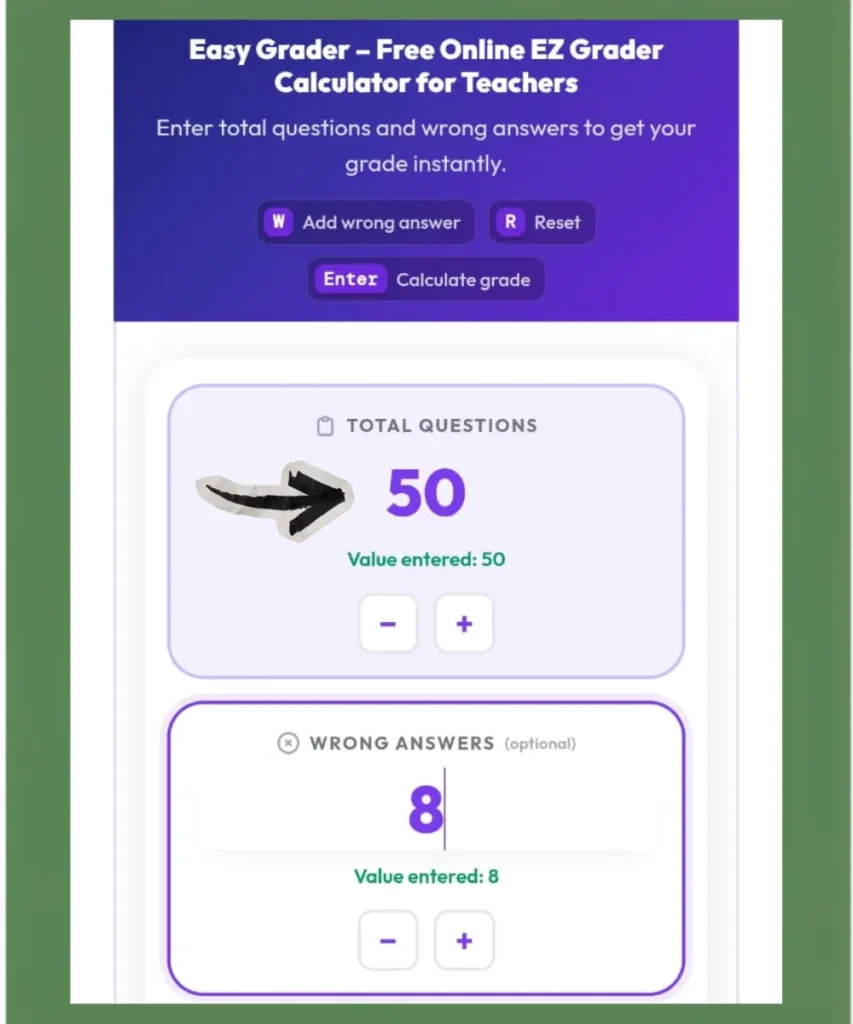
Step 1: Enter Total Questions
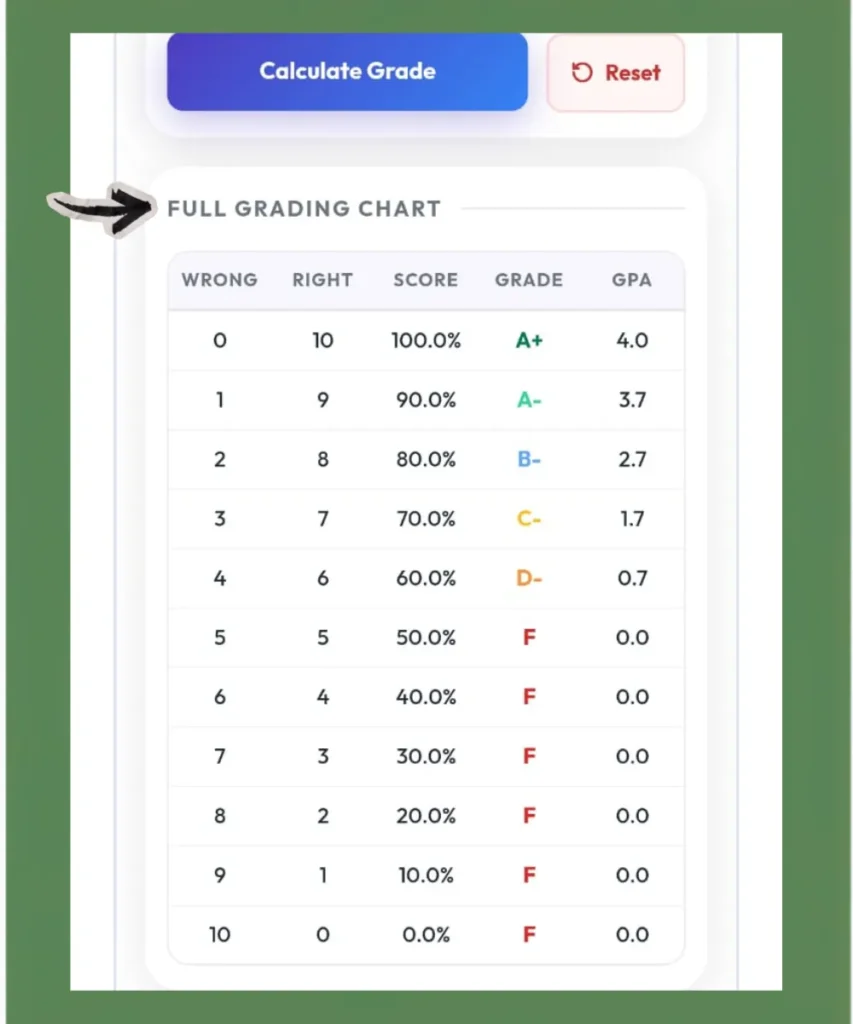
Type the total number of questions on the test into the “Total Questions” field. You can also use the − and + buttons to adjust the number. As soon as you enter a value, the full ezgrader chart appears below. It shows every possible score from 0 wrong to all wrong.
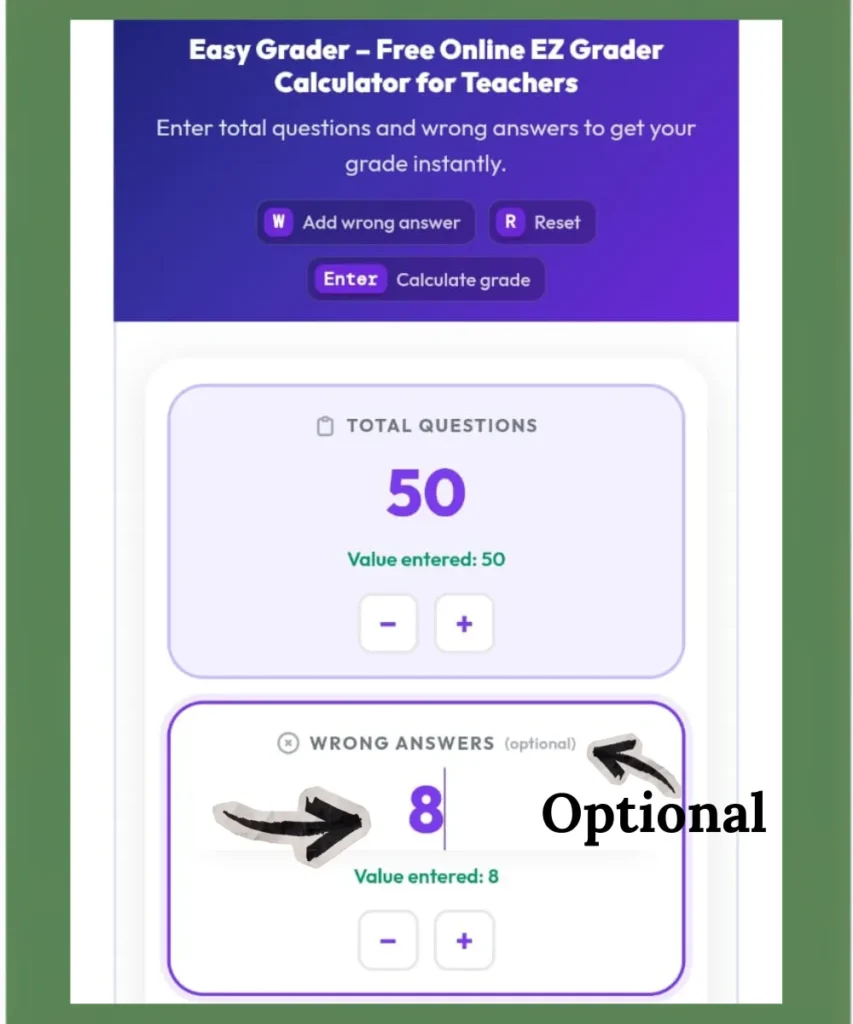
Step 2: Enter Wrong Answers (Optional)
Type how many questions you got wrong. This field is optional; you can leave it empty to browse the chart, or fill it in to get the exact result. Use the W key on your keyboard to quickly add one wrong answer at a time.
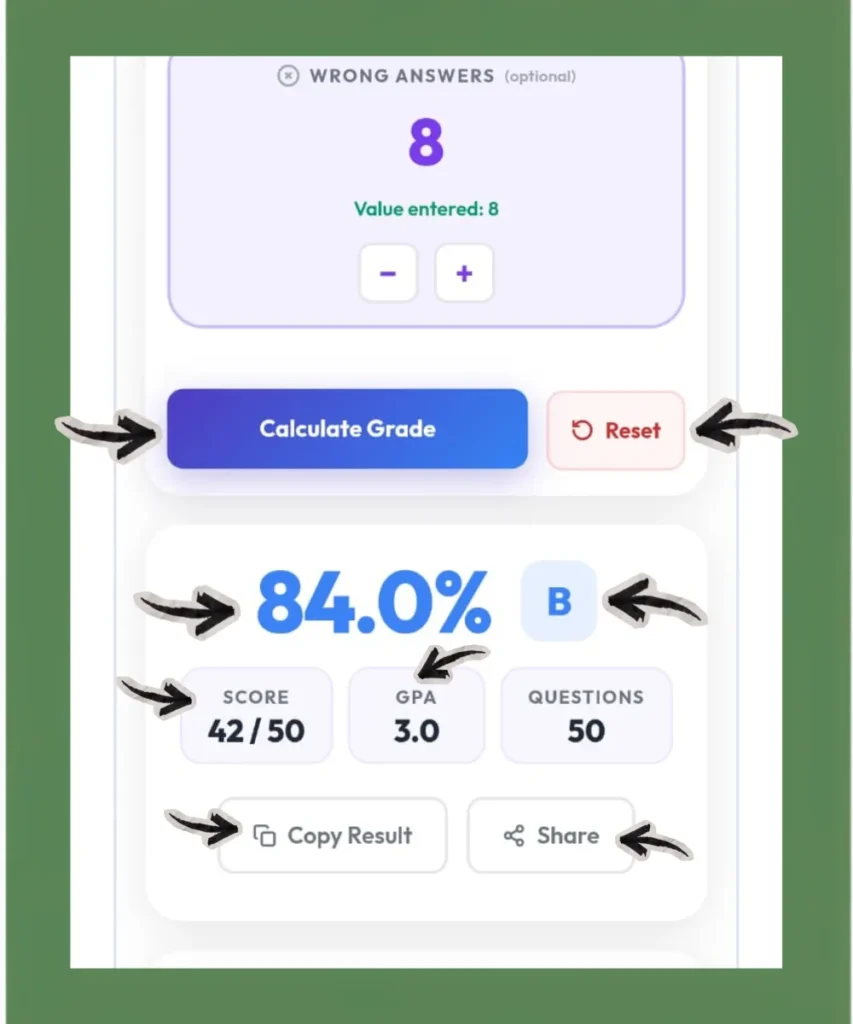
Step 3: Click Calculate Grade
Hit the “Calculate Grade” button or press Enter on the keyboard. The result box shows the student’s percentage, letter grade, and GPA points instantly. The row matching that student’s wrong answers is highlighted in the chart below.
Step 4: Use the Full Grading Chart
The chart below shows every possible score for the test, along with the number of missed questions, percentage, letter grade, and GPA.
Keyboard Shortcuts for Teachers
With these shortcuts, teachers can grade a full class in just a few clicks.
- Press W to add one wrong answer at a time.
- Press Enter to calculate the grade without reaching for the mouse.
- Press R to reset the tool for the next test.
Reset for the Next Student
Click the “Reset” button to clear all the entries. Then the calculator resets to a blank state, ready for the next student’s test.
Easy Grader Formula Explained
The math behind this tool is straightforward. Just follow these two steps to calculate your grade.
Correct Answers = Total Questions – Wrong Answers
Percentage = (Correct Answers / Total Questions) * 100
The percentage then maps to a letter grade and GPA by using the standard US academic grading scale.
Example 1 (40-Question Test, 6 Wrong)
| Total Questions | 40 |
| Wrong Answers | 6 |
| Correct Answers | 40 – 6 = 34 |
| Percentage | (34 / 40) x 100 = 85% |
| Letter Grade | B |
| GPA | 3.0 |
Example 2 (20-Question Quiz, 3 Wrong)
| Total Questions | 20 |
| Wrong Answers | 3 |
| Correct Answers | 20 – 3 = 17 |
| Percentage | (17 / 20) x 100 = 85% |
| Letter Grade | B |
| GPA | 3.0 |
Both examples land at 85% and a B grade, but the test sizes are completely different. That is the point. On a 40-question test, one wrong answer costs you 2.5 percentage points. On a 20-question quiz, one wrong answer costs you 5 percentage points. The fewer the questions, the more every single mistake matters. Enter any combination into the calculator above to see exactly how your score is affected.
Common Score Lookups
Here are some common score conversions teachers and students often need. Enter any of these into the calculator above to see the full result instantly.
| Score | Percentage | Letter Grade | GPA |
|---|---|---|---|
| 18 out of 20 | 90% | A- | 3.7 |
| 9 out of 10 | 90% | A- | 3.7 |
| 45 out of 50 | 90% | A- | 3.7 |
| 35 out of 40 | 87.5% | B+ | 3.3 |
| 20 out of 25 | 80% | B- | 2.7 |
| 16 out of 20 | 80% | B- | 2.7 |
| 3 wrong out of 20 | 85% | B | 3.0 |
| 5 wrong out of 50 | 90% | A- | 3.7 |
| 8 wrong out of 40 | 80% | B- | 2.7 |
| 4 wrong out of 25 | 84% | B | 3.0 |
| 1 wrong out of 10 | 90% | A- | 3.7 |
| 7 out of 10 | 70% | C- | 1.7 |
For common test sizes like 10, 12, 15, or 20 questions, enter the total into the calculator above to get a complete grading chart instantly.
US Grading Scale Reference
This easy grader uses the standard US grading scale that is used across most K-12 schools and colleges. The GPA column is included because this tool shows GPA alongside every result.
| Percentage | Letter Grade | GPA |
|---|---|---|
| 97 to 100% | A+ | 4.0 |
| 93 to 96% | A | 4.0 |
| 90 to 92% | A- | 3.7 |
| 87 to 89% | B+ | 3.3 |
| 83 to 86% | B | 3.0 |
| 80 to 82% | B- | 2.7 |
| 77 to 79% | C+ | 2.3 |
| 73 to 76% | C | 2.0 |
| 70 to 72% | C- | 1.7 |
| 67 to 69% | D+ | 1.3 |
| 63 to 66% | D | 1.0 |
| 60 to 62% | D- | 0.7 |
| Below 60% | F | 0.0 |
Some schools use different cutoff points. For example, some require 95% for an A+ or do not use plus and minus grades at all.
Who Can Use This Easy Grader?
1. Teachers
Teachers can use this online grader to calculate test and quiz scores. It works well for elementary, middle, and high school classrooms. The grading chart also makes it easy to grade an entire class without repeating the same calculations.
2. Students
Students can use this tool to estimate their scores right after a test. Simply enter the total number of questions and the number of missed answers to see the percentage, letter grade, and GPA instantly. The grading chart also shows how each missed question affects the final score.
3. Parents
Parents can use this easy grader to check scores and better understand their child’s academic performance. The grading chart shows how close a score is to the next letter grade and how much improvement may be needed on future tests.
Features of This Easy Grader Calculator
This tool offers more than a simple grade calculation. Here are the features that set it apart from other online graders.
Full Grading Chart
Most easygraders return a single result for one student. This tool generates a complete chart for the entire test at once. It lists every possible score with its percentage, letter grade, and GPA. So, teachers can grade a full classwork without doing a new calculation for each student.
GPA Output
Almost every other easy grader stops at percentage and letter grade. This calculator also shows the GPA equivalent for every result. Teachers can convert test results into GPA values. Students can easily track their academic standing. They don’t need a separate GPA calculator.
Custom Grading Scale
If your school has different cutoff points, use the Custom Grading Scale. It allows you to set your own minimum percentages for each letter grade. Not many online easy graders offer this. Using the wrong scale leads to wrong grades. This can affect your GPA and academic records.
Copy or Share
The Copy or Share buttons make it easy to send your results. By using this feature, teachers can keep digital records, and students can share scores with parents or advisors.
Free and No Login
The tool is completely free with no account creation required. It runs in your browser on any device.
Easy Grader vs Other Grade Calculators
There are a few different types of grade calculators. Each of them solves a different problem.
Easy Grader
This tool converts missed questions into a percentage and letter grade for a single test. Best for teachers grading papers and students checking test scores right after a quiz or exam.
Other Grade Calculators
1. Simple Grade Calculator
A simple Grade Calculator calculates a grade based on points earned and total points possible. For example, if you scored 42 points out of 50, it calculates your percentage and letter grade. It is best for assignments, homework, and individual assessments that use a points-based grading system.
2. Weighted Grade Calculator
A weighted grade calculator averages grades from different assignments. Each category has its own percentage weight. Best for tracking overall course performance across a full semester.
3. Final Grade Calculator
It tells you what score you need on an upcoming final exam to reach a target overall grade. If you have a 74% going into finals and want to finish with a B, the final grade calculator shows the exact score required. This site has a separate Final Grade Calculator for that purpose.
4. GPA Calculator
This calculator converts letter grades from multiple courses into a GPA. Best for students monitoring academic standing across all subjects.
From Physical Easy Grader Card to Online Calculator
For decades, many teachers relied on a physical sliding grade chart to avoid calculating the same percentage by hand for every paper. Grading a stack of 50 multiple-choice tests by hand meant calculating the same formula 50 separate times. The sliding card reduced that to a single alignment and a quick read.
An online grade calculator uses the same method, but makes grading much faster. Enter the total number of questions once, and the tool instantly creates a complete grading chart for every possible score. No grading card and no repeated calculations.
Is This Easy Grader Accurate?
This tool uses the grading formula that teachers and schools use to calculate test scores.
Divide the number of correct answers by the total number of questions, then multiply it by 100 to get the percentage score. The calculator then matches that percentage to a letter grade based on the grading scale you select. If you use the standard US grading scale and enter the correct numbers, you get the same result that your teacher would calculate by hand.
For final grades and report cards, always check your school’s official grading system. This grade calculator is designed for quick estimation.
Conclusion
Grading tests by hand takes time, and repeating the same calculation for every student makes it slower. This free Easy Grader Calculator removes that work. Enter total questions and wrong answers to get the percentage, letter grade, GPA, and a full grading chart instantly.
Teachers can grade an entire class from one entry. Students can check their score right after a test. The custom grading scale works for any school’s grading policy. No download, and no cost. Use the calculator at the top of this page to grade your next test in seconds.
FAQs
This tool is designed for educational reference. For official academic records, always confirm grades with your school’s grading system.